Vless VPN
- 4.4
- Rating
- 500.00K
- Installs
- Free
- Price

 Analysis by App-foxy
I approached Vless VPN as a practical privacy tool rather than a magic shield for every online risk. It is a free Android app in the Tools category, developed by Digi Group Team, and its straightforward purpose is to route your internet connection through a VPN service using the VLESS protocol. That makes the app interesting for people who want a simple way to change how their connection reaches the internet, especially when ordinary network access is unreliable or restrictive.
My first impression is that this is a utility built around a specific technical approach, not a large all-in-one security suite. That distinction matters. You are not choosing it because it replaces antivirus software, protects every account automatically, or explains every privacy decision in detail. You are choosing it because a VLESS-based connection may fit a particular network, server setup, or browsing routine better than a conventional VPN application.
The app has a 4.4 average from around 5.6 thousand ratings, with more than 500 thousand installs. Those figures suggest that it has reached a meaningful audience, but they do not remove the need to judge it carefully for your own situation. VPN apps handle sensitive traffic, so popularity is only one part of the trust question. I would also look at the connection controls, the information requested during setup, the way the app behaves when the tunnel drops, and whether I can understand what I am actually connecting to.
You May Also Like

 Blood Strike: 2.5 Anniversary
Blood Strike’s Loadouts Turn Every Drop Into a Tactical Gamble
A close look at Blood Strike’s custom loadouts: how fast access to signature weapons reshapes its battle royale rhythm, rewards preparation, and narrows the gap between fights.

 Pandora - Music & Podcasts
Pandora’s Music Is Easy to Start, but Harder to Recover
Pandora’s strength is its low-effort path from a seed to a station. Its weak spot is how much confidence it asks you to place in connection, setup, and quiet recovery.

 8 Ball Pool
 Is Built on Rivalries, Rematches, and Routine
A close look at the rivalries, rematches, shared routines, and unanswered safety questions that turn a quick pool match into a persistent mobile community.

 Samsung Music
’s Quiet Strength Is Playing What You Already Own
Its reach comes less from spectacle than from dependable access to a personal library. That simplicity is both the app’s strongest retention engine and its ceiling.

 AccuWeather: Weather Radar
AccuWeather Review: A Quick, Clear Forecast for Everyday Decisions
For everyday plans, the best forecast is the one you can understand quickly. AccuWeather makes rain timing, radar, and local conditions easy to act on, with a few trade-offs.

 Hill Climb Racing
Why Hill Climb Racing Still Turns Crashes Into One More Run
A tiny car, a bumpy hill and one more upgrade: Hill Climb Racing keeps resurfacing because its simple chaos makes every near-miss feel personal.
More From Our News Desk



What using Vless VPN feels like in everyday life
In daily use, the value of a VPN is often less dramatic than people expect. A realistic example is using public Wi-Fi in a café while checking email, opening a banking website, or sending work messages. A VPN can provide a protected route between the device and the VPN endpoint, but it does not make a careless password safe, verify a suspicious website, or stop a malicious app already installed on the phone. I would still use secure websites, keep Android updated, and avoid treating the tunnel as permission to click anything.
Another common situation is a home or mobile network where certain services load slowly, fail to connect, or behave differently from one connection to another. A VLESS configuration may be useful here when you already have access to a compatible server or configuration. The important point is that the app is not automatically a universal solution simply because it is installed. Its usefulness depends heavily on the quality and suitability of the connection details you use.
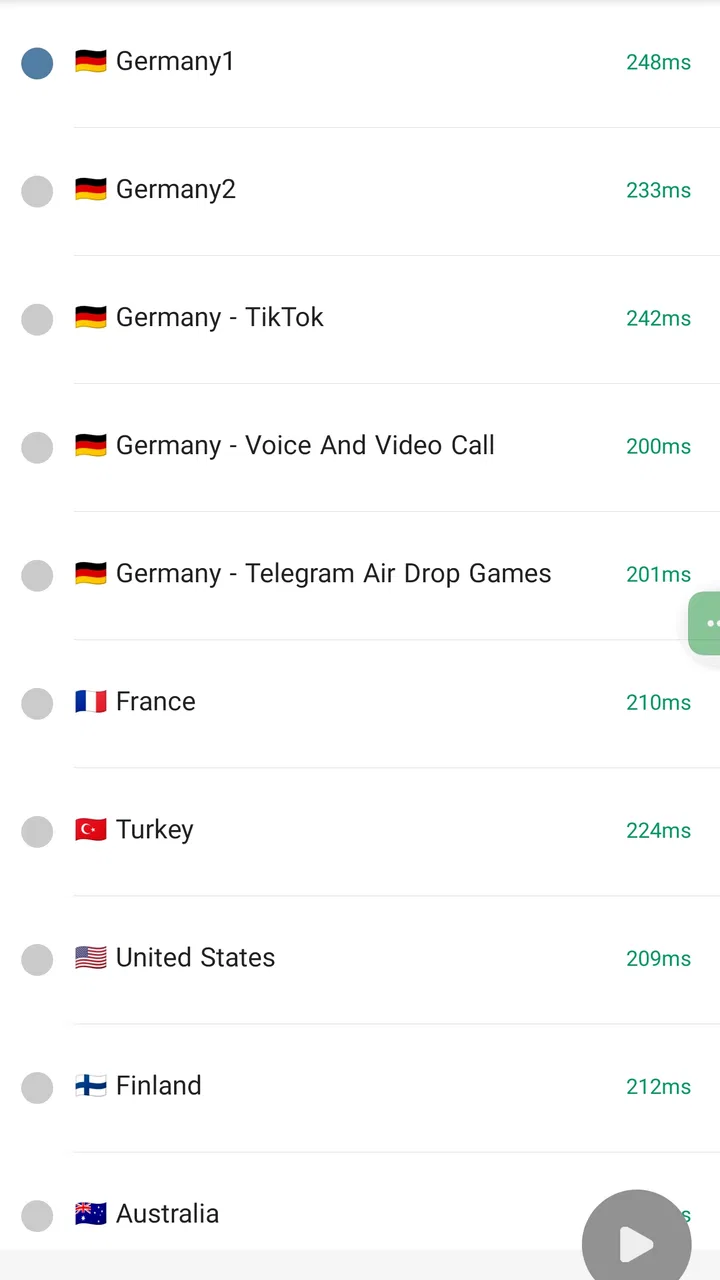
That dependency is the first practical trade-off. A typical commercial VPN often tries to hide the technical side behind a list of countries and a large connect button. Vless VPN is more appealing to someone who understands, or is willing to learn, the basics of a VLESS connection. If you want a polished location picker with a ready-made network, another kind of VPN app may be easier. If you value control over the connection method, this app has a more focused reason to exist.
I also found that a focused tool can be less confusing than a crowded privacy app. There are fewer unrelated features competing for attention, which helps when the only job is to establish a VPN connection and then get back to browsing. At the same time, a focused interface can feel less welcoming to a first-time user if the app expects configuration knowledge. That is not a flaw for every audience, but it is an important boundary.
Trust begins with what the app lets you see
Trusting a VPN requires more than seeing the word “secure” in a description. I would pay attention to the Android permission prompts, the connection request shown by the operating system, and any screen that explains what is being imported or changed. Android’s VPN confirmation is especially important because it gives you a visible moment to understand that traffic is being routed through a VPN service. I would not approve such a request automatically just because I wanted a connection quickly.
With Vless VPN, I would also keep the server source in mind. The application and the server are not the same thing. Even if the app behaves as expected, the operator of the server you connect to can affect your privacy, speed, and reliability. This is a subtle point that many casual VPN reviews skip: installing a VPN client does not by itself tell you who controls the endpoint or how that endpoint handles traffic.
For that reason, I would be more comfortable using a server supplied by someone I trust or one whose ownership and privacy practices I can evaluate. I would be cautious with configuration files shared anonymously in forums or messaging groups. A file can make a connection work while still leaving you unsure about where your traffic goes. The app gives you a tool for making the connection; it cannot turn an unknown server into a known one.
The developer, Digi Group Team, has positioned this as a free utility rather than a paid subscription product. Free access is convenient, especially if you only need a VPN occasionally, but it also makes it sensible to examine the app’s visible choices instead of assuming that “free” means there are no trade-offs. I would read the app’s current privacy information and Android permission details before using it for highly sensitive activity, then revisit those details after major updates.
Controls that matter more than a large feature list
The most useful control in a VPN app is not always the most impressive-looking one. I want to know whether I can choose when the connection starts, recognize its connected state, and disconnect without hunting through several screens. I also want to know what happens if the connection fails. If an app makes it easy to connect but unclear whether traffic is currently protected, that creates avoidable risk.
For Vless VPN, I would build a simple routine around the Android VPN indicator rather than relying only on the app’s screen. Before opening a sensitive service, I would confirm that Android shows the active VPN state. After finishing, I would disconnect when I no longer need the tunnel. This is not as convenient as leaving a VPN permanently active, but it gives me a clearer understanding of when the connection is actually in use.
A second useful habit is testing ordinary apps after importing or selecting a configuration. Open a normal webpage, send a low-sensitivity message, and check whether the connection remains stable while switching between Wi-Fi and mobile data. This catches a common problem: a configuration may connect successfully in one environment but fail when the network changes. It is better to discover that during a routine test than while trying to access an important account.
Another non-obvious trade-off is that privacy and convenience can pull in opposite directions. A VPN may alter the apparent network location, which can cause websites to ask for extra verification or make services behave differently. That does not necessarily mean the VPN is broken. It may be a consequence of the endpoint being recognized as unusual. If a banking app or work service becomes inconvenient, I would disconnect temporarily only when I understand the risk and am back on a network I trust.
For people who use several configurations, naming them clearly can prevent mistakes. I would label them by purpose and source rather than leaving several anonymous entries that look alike. That small organizational step reduces the chance of using a personal connection for work traffic or selecting an outdated server when a newer option is available. It is the kind of practical discipline that matters more than installing a long list of privacy tools.
What to consider before sending sensitive traffic
A VPN can protect traffic across an untrusted local network, but it changes the point of trust. Without a VPN, your network provider can observe certain connection details; with a VPN, the VPN endpoint becomes an important intermediary. This is why I would avoid describing Vless VPN as total anonymity. Your accounts, browser fingerprint, cookies, device settings, and behavior can still identify you even when your network route changes.
I would be especially careful with email, cloud storage, workplace systems, and financial services. A VPN may be useful when connecting from public Wi-Fi, but the account provider still sees your login and activity. Keep multi-factor authentication enabled, use unique passwords, and treat unexpected login prompts as a security warning rather than evidence that the VPN has failed.
There is also a difference between hiding traffic from a local network and hiding activity from the VPN operator. Those are separate privacy questions. Before using an unfamiliar server for private conversations or confidential documents, I would consider whether the server owner is trustworthy and whether the app provides clear information about its data practices. If that answer is unclear to me, I would limit the connection to low-risk browsing instead of assuming that encryption solves the entire problem.
Performance deserves the same cautious treatment. A VPN can add delay because traffic takes an additional route, and the result depends on the server, the network, and the distance between them. I would not judge the app after a single slow connection. I would compare the same website with the VPN off and on, try a different trusted configuration if available, and watch for repeated failures rather than one temporary interruption.
Streaming and location-sensitive services are another area where expectations should stay realistic. Changing the route may not produce the location a service expects, and it can trigger verification or access restrictions. If your main goal is effortless access to region-specific entertainment, a mainstream VPN with clearly managed servers may be a better fit. Vless VPN makes more sense when the connection method and personal control matter more than a guaranteed media catalog experience.
Who gets the most from this focused tool
I would recommend trying Vless VPN if you already have a legitimate VLESS configuration, understand who operates the endpoint, and want a free Android client for occasional or repeated use. It can also suit technically curious users who prefer a direct tool instead of a subscription-focused VPN brand. The app’s age rating is Everyone, and it supports Android from version 5.0 onward, so compatibility is broad for older devices as well as newer ones.
It may also help someone who has been given a configuration by a trusted administrator, family member, or private network operator. In that case, the app can serve as a convenient access point without requiring a large security bundle. I would still verify the source of the configuration and keep a backup of the original details somewhere safe, because troubleshooting is much easier when you know what changed.
I would skip it if your priority is a completely guided experience with no configuration decisions. A beginner who expects to open the app, select a nearby country, and receive a ready-to-use network may become frustrated. I would also choose another solution if I needed a business VPN with centralized account management, formal support, device policies, or a clearly managed fleet of endpoints. This app’s focused nature is an advantage only when it matches your needs.
Parents should remember that a VPN does not replace content filtering or supervision. The Everyone rating describes the app’s general suitability, not the safety of every website reachable through a VPN. If the goal is to manage a child’s browsing, use the operating system’s family controls and a suitable filtering approach rather than assuming that a VPN provides age-appropriate protection.
Version, cost, and the decision to keep using it
The app is free, and its current version is 1.10.48. That makes experimentation relatively low-risk financially, but I would still avoid installing it casually and forgetting it. VPN software sits close to the device’s network activity, so I would pay attention to update notes, Android prompts, battery behavior, and whether the connection remains understandable after an update.
Released on December 30, 2024, it is still a relatively recent choice compared with long-established VPN products. That does not make it unreliable by itself, but it encourages me to evaluate it through repeated personal use rather than reputation alone. I would keep the app only if it connects consistently, makes its active state clear, and fits a server arrangement I trust.
My practical test would take place over several ordinary situations: a home network, mobile data, public Wi-Fi, and a switch between the first two. I would check whether normal browsing works, whether important apps still connect, and whether disconnecting returns the device to its expected network behavior. I would not use a single successful connection as proof that the setup is suitable for every sensitive task.
The strongest reason to choose this app is control with relatively little financial commitment. The strongest reason to hesitate is that control brings responsibility. You need to understand the configuration source, confirm the operating system’s VPN state, and accept that a changed route can affect speed and account verification. Those are manageable conditions for an informed user, but they are not details I would hide from a friend considering it.
My cautious recommendation
After looking at Vless VPN as a real privacy tool rather than a slogan, I see a useful, specific app for Android users who have a trustworthy VLESS connection and want a free client from Digi Group Team. Its 4.4 average and more than 500 thousand installs show that many people have chosen it, while the 55 written reviews indicate a smaller body of detailed public feedback than the rating count might suggest. I would treat those signals as encouraging, not conclusive.
My recommendation is conditional: use it when you understand the server and want VLESS-based control, but do not mistake the app for complete anonymity or automatic security. Start with low-risk browsing, examine Android’s VPN confirmation, test the connection across the networks you actually use, and keep sensitive accounts protected with their own security measures.
For me, that makes Vless VPN a reasonable tool rather than a universal answer. It is best for a user who values a focused VLESS workflow and is comfortable making informed choices about configurations. If you want a polished, managed VPN experience with minimal technical involvement, a different category of VPN will probably feel better. If you want a free way to work with a trusted VLESS setup and are willing to stay attentive to privacy and connection behavior, this app is worth considering.
FAQs for Vless VPN
01What is Vless VPN and how does it work?
Vless VPN is a secure virtual private network application designed to protect your online privacy and security. It encrypts your internet connection, making it difficult for hackers or third parties to track your online activities. By routing your internet traffic through secure servers worldwide, Vless VPN ensures anonymity and access to geo-restricted content.
02Is Vless VPN free to use or does it require a subscription?
Vless VPN offers both free and premium plans. The free version provides basic features with limited server access, while the premium subscription unlocks additional features like faster speeds, more server locations, and enhanced security. Users can choose a plan based on their needs, with subscription options typically including monthly or annual payments.
03How does Vless VPN ensure user privacy and data protection?
Vless VPN employs industry-standard encryption protocols to safeguard user data. It adheres to a strict no-logs policy, meaning it does not store any user activity or connection logs. This commitment to privacy ensures that even if data were requested, there would be nothing to share, thus maintaining user anonymity and security online.
04Can I use Vless VPN on multiple devices simultaneously?
Yes, Vless VPN allows users to connect multiple devices simultaneously under one account. Depending on the subscription plan, you can typically connect up to five devices at the same time, ensuring privacy and security across all your devices, whether they're smartphones, tablets, or computers.
05Does Vless VPN support all major operating systems and devices?
Vless VPN is compatible with a wide range of operating systems, including Android, iOS, Windows, and macOS. It also supports various devices, ensuring that you can protect your internet connection whether you're using a smartphone, tablet, or computer. Make sure to check the specific compatibility requirements on their website before downloading.
Pros
- Fast connection speeds enhance browsing experience.
- User-friendly interface makes it easy to use.
- Supports multiple devices simultaneously.
- High-level encryption ensures data security.
- Reliable customer support available 24/7.
Cons
- Limited server locations compared to competitors.
- No free version available for trial.
- May slow down during peak usage times.
- Advanced features require premium subscription.
- Not all streaming services are accessible.

Vless VPN
Gallery